Touch Control
This guide explains how to set up a Touch Control Panel using the Loft App.
⚠️ Keep in mind: To set up a Touch Control Panel, the device must already be installed. If don't know how to install a device so click here.
Watch The Video Tutorial
Steps to Setup Touch Control Panel
-
Open the Loft App
- Navigate to the Rooms section.
-
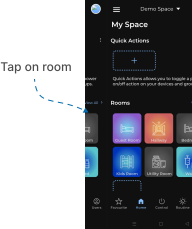
Select a Room
- Tap on the room where your Touch Control Panel is installed.
-
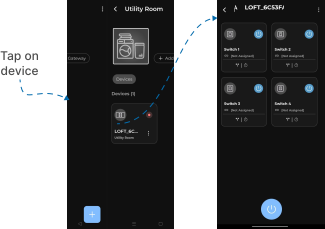
Locate the Device
- Find the Touch Control Panel you want to set up.
- Devices pending setup are marked with a red dot.
-
Start Setup
- Tap on the device to setup.
- When the Panel Control interface screen is displayed, your Touch Control Panel Setup is Complete.